Click Networks - IT Support Glasgow

Click Networks - IT Support Glasgow
Showing posts with label it services. Show all posts

Monday, 23 September 2013

Office 365 goes to work on an Android

Office 365 on Android Copy Item Screenie
Hands on Unlike the video editing or CAD workstation beasts that are still utterly reliant on Windows, Android is slowly evolving into a workable platform for basic productivity.

Browsers are becoming passable. Onboard applications are decent and there are an ever-growing number of applications designed for both touch input and mouse.

Yes, our little Android is growing up – that is, of course, if we ignore the total lack of a usable productivity suite.

Android is sneaking up on five years of general availability and it still doesn't even have a word processor that can compete with Microsoft Word 2.0 running on Windows 3.1.

If you want to paw at your screen like a primitive, there are plenty of applications to let you consume content others have made. There are even a few applications that will let you edit a word document or enter some numbers into a spreadsheet. Slowly.

Touch input has severe limitations. The first is a maddening upper limit on input speed and accuracy defined by trying to hit touch targets that are significantly smaller than your fingers and offer no tactile response whatsoever. Editing, formatting and related tasks are byzantine in a touch-screen world.

Consider the humble task of highlighting a block of text. On a touch screen you have to stab exactly the right spot, hope the device recognises the great big blob that is your finger, press, hold and then wait for the selector widgets to pop up.

After that you drag them around until you have highlighted the relevant text, go find a touch target that says "cut" or "copy" and then do something with that text.

In the time it has taken a touch-screen user to do that, I have already moved the text where it needed to go and written another four paragraphs of useful text. Touch screens are simply terrible for real work.

One man and his mouse

Despite this, I keep getting users who want me to make their Android devices into all-purpose endpoints. They have an Android phone with four cores and more RAM than that Acer Aspire from the mid-2000s that is wheezing its last.

They have a Nexus 7 or an Asus Transformer that they carry everywhere and they don't want to haul around some ageing notebook that gets the digital equivalent of three miles to the gallon and doesn't make it through a full-day conference.

Android is not going away, so how do we get something usable on there? The answer depends entirely on the device you have, the version and all the other irritating little things that make Android ecosystem fragmentation such a topic of legitimate complaint from developers.

In my opinion, the best option currently available for a productivity app running directly on an Android device is Office 365's web app. The latest version is amazing. It beats Google's efforts and is so far ahead of everyone else that at this point trying to catch up would be a depressing endeavour.

Run Dolphin in Desktop Mode

To get the Office 365 web app working on an Android device – assuming you have a subscription – you need to set your browser to request the desktop site.

Chrome can do this out of the box. Dolphin can do it by enabling the "desktop toggles" extension. Unlike Chrome, when you turn the extension on in Dolphin it stays on and passes desktop headers to all future sites.

Run Chrome in Desktop Mode

The problem is that the Office 365 web app simply doesn't work on most Android devices. Chrome flatly refuses to treat the mouse like a mouse. You can't highlight things like an adult and forget right-click context menus.

Dolphin is somewhat better. It doesn't understand the concept of multiple buttons on a mouse and thus you can't get your right-click context menus, but at least it passes the primary mouse button back to the Office 365 application so we have highlighting, dragging and dropping.

Office 365 is actually rather well designed for single mouse button scenarios, so although the lack of a context menu slows me down, it is not a show stopper.

Office 365 for Android on Dolphin

Hardware definitely limits possibilities. My first-gen Asus Transformer's 1GB of RAM simply isn't enough. The anaemic Tegra 2 struggles to keep up, and frankly the whole thing is a mess.

The quad core and 2GB of RAM in my Galaxy Note 2, however, seems to do the trick. Dolphin has no trouble here. Off I go writing articles.

Phone fodder

Microsoft has created a downloadable Office 365 app for Android phones. That naturally lasted about eight seconds after the announcement of availability and you have to be deaf, dumb and blind not to be able to find the .apk file if you go looking for it.
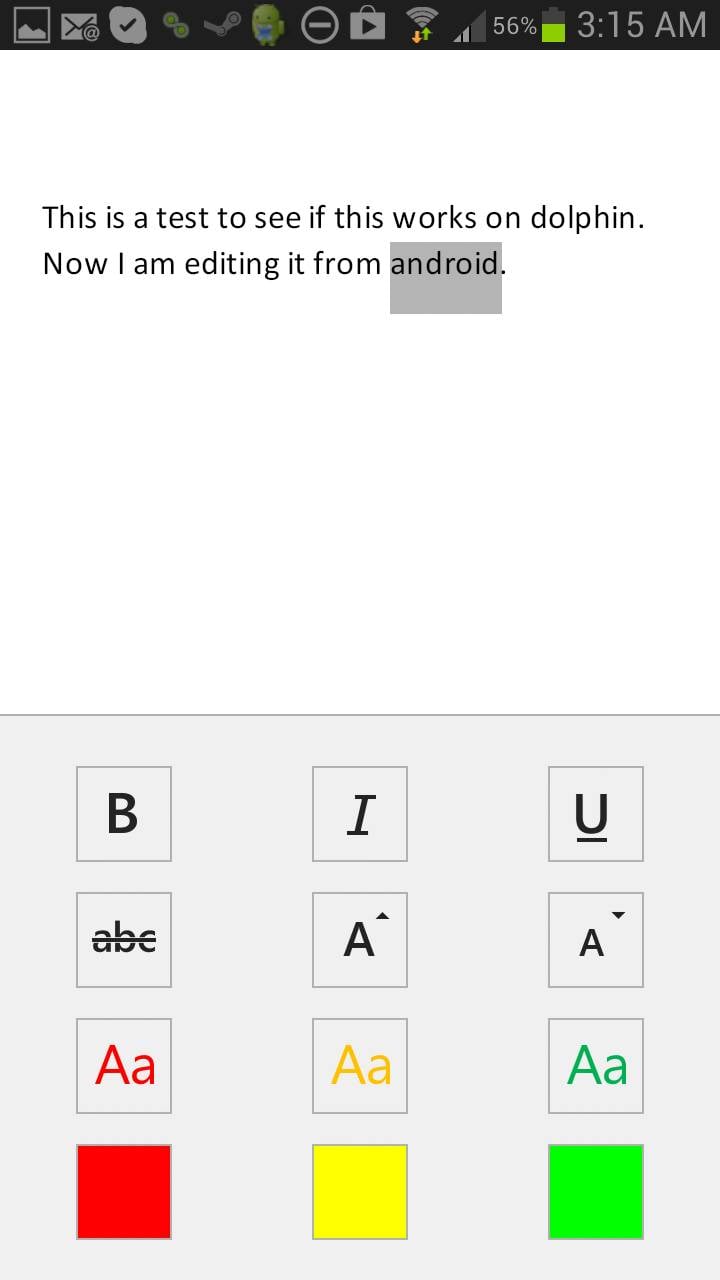
Office 365 for Android Text Modification OptionsAt first, I was rather irked with Microsoft. I figured it was doing something irritating like protecting its office monopoly by restricting the Office 365 app to phones.

But the rationale is far more mundane. In truth, the app is exactly right for a phone and useless for a tablet.

You won't be writing articles on a phone. Not even a Note 2. (I have tried. It causes all of the sads.) You might open a document, make a few token changes and save it… and that is all the Office 365 app is good for, though you can create documents and spreadsheets if you wish.


Microsoft's efforts with the Office 365 app are in line with the previous yeoman's work done on the OneNote and Lync apps. They are absolutely top-quality applications for the intended target market.

Target practice

I expect Microsoft will have to write a separate Office 365 app for Android tablets, assuming we can convince it that there is enough of a target market there to care about.

It is really a chicken-and-egg situation. People steer clear of Android tablets because the tablets don't have a good productivity suite. They don't have a good productivity suite because there is no market for it.

The more important question for Android users is why would Microsoft be interested in jump-starting the Android tablet market?

Anyone who starts using Android tablets for productivity won't be coming over from Apple. They would be choosing Android instead of Windows and there is not much profit in that for Microsoft.
In almost every technical aspect¸ Windows RT is a better operating system. The problem is that Microsoft blew the launch and missed a very narrow window.
The tablet market is still very much up in the air
Microsoft completely miscalculated the price people would be willing to pay, didn't include Outlook, had no app ecosystem to speak of and artificially restricts developers and end-users from turning Windows RT into a full-blown productivity device.

Despite this, the tablet market – and dominance of the next generation of endpoints – is still very much up in the air. Google constantly machine guns its own feet with exactly the same sort of short-sighted protectionist nonsense that has been hindering Microsoft for years.

The allergy to mice in Chrome for Android is one example: Google sees mice in Android as a massive threat. Android is local-application based.

If people could use a keyboard and mouse with Android properly, then they would have no reason to move away from the local-application model. Google's future is bet on SaaS applications and tied to Chrome OS.

The browser rules

Under no circumstances does Google want Windows to be replaced by Android. Android could fork and suddenly Amazon is somehow a player. Google wants you in the browser where it can own you.

Office 365 for Android Copy Balls

When push comes to shove, however, what people actually want is Microsoft Office on their Android devices. We can get it on our phones. The lucky few can get a mostly working version in their browsers. The rest of us will work around the limitations and wait.

The redefinition of the endpoint brought about by the mobile revolution is still underway. With the release of a working Office app for Android phones – something once considered an outright fantasy – all bets are off.

Read the full article here:  http://www.theregister.co.uk/2013/09/20/office_365_on_android/

For more information on anything you have read in this article please contact the IT Experts at Click Networks on 0141 530 9116 or visit our website: http://www.clicknetworks.co.uk 

Monday, 12 August 2013

Google Launches New Gmail Tabs To Bad Press

A couple of months ago, Gmail launched a brand new tabbing system for inboxes, sending users and marketers into a veritable frenzy. The new tabs aim to organize your inbox into three core sections: Inbox, Social, and Promotions.

Your default inbox will mostly contain personal or business-related emails that are likely from people you know directly. Social contains blasts from social networks, like LinkedIn connection requests and Facebook mentions, as well as news from any social tools you subscribe to. Promotions is pretty
self-explanatory – this ought to contain consumer-focused newsletters, discounts, and related marketing materials.

It’s obvious why marketers would specifically be worried – will their meticulously crafted newsletters be sent into utter obscurity, now that users must click one more section to read them?
The answer is simple: there’s nothing to panic about. If you already create quality content that your audience wants to read, they will still get your blasts. If you’ve been sending meaningless drivel, however, you’ll still be ignored or marked as spam.

See? The sky isn’t falling. Here’s proof.

Users are Still in Charge
The new tabs are simply a way to keep our oft-cluttered inboxes much more organized. Some, however, are erroneously touting that Google is getting bossy.
Take the team of customer support experts HelpScout. In a recent article about the new tabs, they had this to say:

“The premise behind these changes is sound, but there’s a major concern to be addressed: Google is now organizing your inbox for you, and it can be argued that they are filtering messages without your consent.”

Without my consent? That’s a bit dramatic. The truth is, Gmail users still have full control over their inboxes. Google now attempts to organize things into folders, but we all have a very easy way to override the filtering. Nothing is etched in stone.

See an email in your Promotions tab that you feel belongs in your default inbox? Simply drag it from promotions onto the Inbox tab, and wahlah, it’s official. At that time, Gmail will ask if you’d like to move all emails from that sender into your inbox – if you click yes, it’s a done deal (until, of course, you move it elsewhere.)

Google hasn’t become the email police. They just decided to respond to the bazillions of users complaining inboxes were too crammed and messy.

Now, the real question is, are the new tabs preventing folks from reading newsletters? Let’s investigate.

How the Tabs Affect Online Marketers
We will first tackle this from a user perspective. The verdict’s still out about whether or not this will decrease readership of marketing-centric emails, but regarding those that are actually appreciated by consumers, they will still get read.

The Promotions and Social tabs illuminate nicely when new email lands in either one, and it’s incredibly simple to click over and see what’s landed. If you, as a marketer or business owner, have worked hard crafting worthwhile emails that users have voraciously consumed in the past, expect that to continue now. Organization is not a barrier to entry.

Most people already organized their email consumption; meaning that when one has free time, one dives into the promotional type emails, and responds accordingly. Nothing dramatic will change with the new tabs, except that perhaps you can’t get away with sending bad content anymore. Those days have been numbered for some time anyway.

The concerning part of all of this, however, lies in the additional way Google is using the Promotions tab. They are now sending unsolicited advertisements through this tab, thinly veiled as promotional emails. It’s easy enough to spot them – they have an “ad” label – but it still smacks of a sneaky way to shove more ads at us. Still, that’s how they make money – and since they’re only doing it in the promotions area, it’s not so heinous.

Don’t Believe the Negative Hype
Since the tabs were released, the internet has been teeming with angry marketers making extremely dramatic claims. Many quote a recent MailChimp survey that tracked early statistics on newsletters, and they did show a slight decrease in readership. But please don’t jump to conclusions like the masses, as this survey did not capture a huge majority of Gmail users that just recently enabled tabs. In other words, it was a premature survey with limited reach. Nothing to bet the farm on.
So what should you do? First, don’t panic. There’s no data supporting the negativity and fears, so hang in there. Next, follow the steps below to ensure you’re creating content your users want.

How to Weather the Gmail Tab Storm
Be proactive in your approach now that the tabs have launched; let them motivate you to create better marketing materials. Here are some top tips:
  • In your next communication (and all future blasts), ask your users to move your content to their primary inbox, and link to easy instructions that tells them how (either through the drag/drop process or reverting back to the Classic view.)
  • Study exactly how Gmail is filtering all communications, and take steps to prevent your other sends from landing outside the primary tab.
  • Concentrate your communications on valuable information in your niche or industry, and not so heavily on your own company promotions. In other words, create content people actually want to read, and you seriously have nothing to worry about.
Why Marketers Should Embrace the Tabs
There is a big upside to these new tabs that few are discussing. These changes may even increase the readership of newsletters overall. Think that’s crazy talk?

Consider it this way – in the old model, all emails were crammed into a single view, with little rhyme or reason. That means your company newsletter had to compete with an email from mom, from various critical business partners, or from little Tommy who just learned to write. You aren’t going to win that battle for attention.

But you may very well earn the click-through when you’re sitting next to other, less interesting promotional sends. If a user clicks the Promotions tab, they know exactly what to expect – you have their attention. It is therefore up to you to not lose it in those critical moments.

See, it is possible that Gmail’s new system is a win-win. I challenge you to view this as a glass half-full scenario and see what the data tells us in the near future!

Read the full article here: http://www.sitepronews.com/2013/08/12/google-launches-new-gmail-tabs-the-fallout-report/

For more information or advice on any of the topics raised in this article or with more specific IT Support questions why not contact the experts at Click Networks today with your query. Visit our website for all contact information and support here: http://www.clicknetworks.co.uk

Thursday, 1 August 2013

O2 to launch 4G in UK on 29th August 2013

Mobile network O2 has announced that its 4G service will launch in the UK on 29 August.

The new network, which it claims will be up to five times faster than 3G, will be switched on in London, Leeds and Bradford first, followed by a further 10 cities before the end of 2013.

O2, which is owned by Spain's Telefonica, aims to make the service available to five million people on launch and an additional two million people per month thereafter. It aims for its 4G network to reach 98 per cent of the UK population by 2015.


It will be the second 4G network to launch in the UK, after EE, which launched its 4G services to 20 million people eight months ago across 11 cities.

O2 will therefore be playing catch-up with EE, which has also already rolled out "double-speed" 4G in 15 cities, and stated that by the end of June, it had 687,000 customers signed up to its new network.

O2 invested £550m to secure the 800MHz spectrum at the 4G auction earlier this year, but was tight-lipped on a launch date. It has, however, beaten rivals Vodafone and Three in launching 4G, and claimed that it will be differentiating itself by "bringing to life the digital experience for its customers".

It said this would start with 12 months free music content for consumers that buy a 4G tariff directly from O2.

The mobile operator will offer 4G phones such as the Sony Xperia SP, Samsung Galaxy S4, HTC One, Nokia Lumia 925 and the BlackBerry Z10. The iPhone 5 will not initially be offered on O2's 4G network.

O2's cheapest tariff will be £26 per month, but details on what is included in the tariff and what alternatives will be available are yet to be disclosed. In comparison, EE's cheapest tariff is £21 per month, albeit with a capped data limit of just 500MB. 

Read the full article here. For more information on anything you have read in this article or for any IT Support or advice call the IT Support Experts at Click Networks today on 0141 530 9116. Visit our website for all our latest news and goings on http://www.clicknetworks.co.uk  

Monday, 3 June 2013

10 Firefox features you should know about

A raft of new features have either been added to Mozilla’s browser or are on the way (showing up in the Beta, Aurora and Nightly builds). Here are the most noteworthy.

Private Browsing

This mode lets you browse in a private session where the cookies, history and other things tied to your browsing activity are purged after you close the program. From the browser, you launch a new, separate browser window in private mode, and it will run simultaneously along with the normal one (which you can close, but continue to use the private-session mode).

Third-Party Cookies Blocked

A future version of Firefox is planned to specifically block third-party cookies by default. The scheme will permit cookies originating from sites that you regularly visit, but prevent those from installing that come from other sources (like an advertising company) you don’t directly visit. A similar version of such a privacy protection is already built into Safari, while Chome allows all cookies and Internet Explorer blocks some third-party ones.

Click To Play Plugins

Mozilla applied their Click to Play security system to all third-party plugins, except to whichever is the latest version of Flash at the time. So by default every plugin embedded in a web page is now blocked with a notice, and you need to click this notice to activate the plugin. Click to Play also advises you to update the plugin in question to its latest version. If you trust a particular website, you can whitelist it so that Firefox automatically loads any plugins on it whenever you visit.

Plugin Warnings

Speaking of plugins, if one freezes up for more than 11 seconds, the latest Firefox will notify you and let you restart the plugin -- and do so without needing to reload the browser.

Faster JavaScript Processing  

Firefox now uses a JavaScript engine named IonMonkey that’s faster than its predecessor. Indeed, when used to interact with certain JavaScript-heavy sites, like Facebook, the latest version of the browser has a noticeable improvement in speed over last year’s releases.

Download Manager Toolbar

There will soon be some enhancements to the way Firefox handles downloads. To the right of the search box, there will be a toolbar icon of a downward arrow that will show the time remaining for a file as it is being downloaded. Click this icon, and a small status window will pop open below it, showing a progress bar for the download. These little touches won’t be enough to replace the more sophisticated third-party download managers available for Firefox as extensions, but they should be sufficient if you don’t do much file downloading through the browser.

Built-In PDF Viewer

Chrome and Safari have had this convenient function for a while, and now Firefox will, too, as of its final Version 19 release. Click a link to a PDF file, and the browser will load and display the document in a tab, rendering it via the wonders of HTML5 and JavaScript. You can also use Firefox to load and view PDFs already saved on your computer’s local storage medium.

Retina Display Support

The OS X version of Firefox supports the high-resolution, pixel-dense screen of the MacBook Pro with Retina Display. So the GUI and text of Firefox running on OS X 10.7 or greater do not appear tiny on these Apple notebooks, and look sharper.

UI Improvements to Firefox for Android

With regard to Android, the Mozilla team has been adding noticeable improvements to the mobile version of Firefox Beta and Nightly. It now has a private browsing mode, although, if you have normal and private sessions open, they both run under one instance of the browser. Other enhancements concern the placement of the tabs tray: it will automatically reposition itself horizontally if you hold your phone in landscape mode, and vertically if you hold your device in portrait mode. But its positioning is opposite when the browser is used on a tablet (i.e. vertical when held in landscape mode, etc.).

Firefox for Windows 8 Modern

Mozilla is developing a variant of Firefox for the Windows 8 Modern UI. As of this writing, it comes with the Firefox Nightly for Windows build, and is activated when you set it as the default browser for your Windows 8 system. So far, Metro Firefox is a very basic browser with a minimal feature set. It sports a mobile-centric UI, which is essentially identical to that of the Android version of Firefox. Its present incarnation doesn’t offer a browsing experience that is faster, or otherwise better than Internet Explorer 10. But Firefox is, for now, the only alternative web browser designed to adhere to the Modern UI guidelines.

Read the full story here: http://www.computerworld.com/

For more information about this article or on anything you have read in our blog please contact the IT Specialists at Click Networks today on 0141 530 9116 of email us at info@clicknetworks.co.uk or visit our website here: http://www.clicknetworks.co.uk

Wednesday, 8 May 2013

How to get your post seen on your Facebook News Feed?

Let’s start by stating the obvious, Facebook’s EdgeRank is complicated and it will be nearly impossible for any business to lay down an accurate projection of what is going to happen with each post published to the network.


While that could be a huge waste of time, having a basic understanding on how Facebook determines why some people sees your posts and others don’t is very important.

There are many factors playing a role in this mumbo jumbo that goes from previous affinity between the source and the recipient to the impact each piece of content generates and even negative feedback. All these items are directly affecting your Facebook Reach on a post-by-post basis.

The Infographic breaks down Facebook’s News Feed algorithm in 2 categories, which helps understand this better:
  1. Personal Interaction, which includes affinity with the author and type of post
  2. Network Reaction, which of course means engagement, positive or negative.
One last thing I’ll mention before leaving you is this, the News Feed is the single most important element of Facebook, you should understand how it works. In 2012, 40% of the time spent on the site goes to the News Feed, compared to 27% the previous year.

Read the full article here: http://socialmouths.com/blog/2013/04/17/who-is-more-likely-to-see-your-posts-on-the-facebook-news-feed-infographic/#more-11283 

For more information on anything you have read here or for more information on how to impove your online social media presence contact the IT Support Experts at Click Networks on 0141 530 9116 or visit our website here: http://www.clicknetworks.co.uk 

Wednesday, 6 February 2013

Click Networks - Cloud Services

View our brand new range of cloud services below and visit our website for more information on how these services can benifit your business and save you money! Click Cloud Services: http://www.clicknetworks.co.uk/Cloud/Cloud.aspx
 

For more information and for what services Click Networks can provide please contact our IT Support Experts today! Tel. 0141 530 9116 or email info@clicknetworks.co.uk

Visit our website: www.clicknetworks.co.uk

Wednesday, 9 January 2013

Whats new from Click Networks in 2013

Happy New Year from everyone at Click Networks
New for 2013 - Professional IT Support without hidden costs

Why choose Click Networks to support your IT
Quite simply, we have been around long enough to understand what our clients want and what they expect to pay for. Therefore we have listened and are proud to be different from most other IT companies.

It is very common practice in our industry for most IT companies to charge anything from £95- £115 per hr to install a single PC, Printer or even a smartphone!!

Click Networks do not charge our managed service clients for installing new Printers, PC's, or even migrating data from their old PC's to the new ones. This could save you £100's each time you add or replace some PC's.

We even offer our managed service clients a free configuration service to set up their Smartphones, Ipad's Tablets and similar devices. This costs us time and money, but we believe it demonstrates our total commitment to providing a unique managed IT Service.


If you want to save money in 2013 with your IT Support and associated services, call our sales team today on 0141 530 9116 and see how much we could save you.

Monday, 7 January 2013

Google aims to lure '90% of Microsoft Office users'

Google is looking to lure 90 per cent of all Microsoft Office users to its Google Docs offering.
In an interview with AllThingsD, Google vice president and head of enterprise, Amit Singh (pictured), said that Google will step up its pursuit of business users.

"Our goal is to get to the 90 per cent of users who don't need to have the most advanced features of Office," he said.

The remaining 10 per cent of "advanced" users will continue to use the desktop version, he suggested.
Singh went on to explain that although Google Docs already coexists with Microsoft Office, the company is working hard to improve integration.

"In Q3, if you import from Excel into Sheets, you won't be able to tell the difference in Sheets. We know the gaps between our features and [Microsoft's]. We're improving them week by week," he explained.

Singh claimed that Microsoft's approach to its cloud offering was to increase the cost to its customers. He also claimed that Microsoft's overall market share had declined.

"Enterprise is the place where they are holding on. People are showing up at the office and bringing their own devices and expecting their employers to support them. And with Windows RT, there is no backward compatibility with all the apps. That's the first time that has happened in Windows. The Windows 8 move, they have done what they need to do, but it's fairly disruptive. SkyDrive is coming. SharePoint needs to integrate with Yammer. So, change is coming whether you like it or not," he said.
Google's rivalry with Microsoft in this area ramped up in 2012, with both vying for enterprise customers with infrastructure-as-a-service (IaaS) offerings in Compute Engine and Azure. Google had introduced Drive to enable users to store documents in the cloud and in response, Microsoft launched a similar service dubbed SkyDrive.

In late September, Google said that it would stop allowing users to save and export Google Docs files created using older 1997 to 2003 Microsoft Office formats from October 2012.

But due to a backlash, it subsequently gave users until 31 January 2013 to make the transition.
Google then announced that Google Apps, which includes Docs, would no longer be offered free to enterprise users. This suggested that users would have to make a choice between paying for either Microsoft Office or Google Apps.

Most recently, Google revealed that it had no plans to develop dedicated apps for Windows 8 or Windows Phone 8 for its business products such as Gmail or Drive – even though the firm remains committed to improving and updating its iOS products.

Read more: http://www.computing.co.uk/ctg/news/2233437/google-aims-to-lure-90-per-cent-of-microsoft-office-users#ixzz2HHK5JP6g
Computing - Insight for IT leaders

Tuesday, 11 December 2012

What tablet to buy this Christmas?

We start with Microsofts Surface’s 1366 x 768, 10.6in IPS LCD screen which may only boast a pixel density of 148dpi but its 16:9 aspect ratio is shared with most laptops and TVs so you feel right at home from the off. This is a tablet that unashamedly delivers a PC experience, which I take to be A Good Thing. With an Nvidia Tegra 3 under the bonnet, a choice of clever attachable keyboards-cum-covers, a built-in kickstand, a proper USB port and an SD slot good for cards up to 64GB, it’s a device both powerful and versatile.

And don’t forget, the Surface comes with Microsoft Office pre-loaded. That’s the sort of productivity offering you just don’t get with Android or iOS.

On the downside, at £400 it’s not cheap; the OS takes up a huge chunk of the advertised storage space; both the Touch and Type keyboards are optional extras; there’s no GPS; and the Windows RT app store is close to empty at the moment.

Even the most devout fan of Android would have to concede that it has failed to repeat its smartphone success in the tablet arena but in the second half of the year Google came out swinging to try and fix that.

In the summer, it launched a Tegra 3-based 7in, 1280 x 800 tablet at a staggeringly low price. The Google Nexus 7 immediately won friends thanks to it’s powerful quad-core processor, excellent IPS LCD screen and Android 4.1 Jelly Bean OS, which debuted on the new tablet.

Just last month, the 16GB version dropped to £159 replacing the 8GB model yours truly bought, while a 32GB 3G device was also introduced at a very reasonable £239. The price changes have made something that was already very attractive even more so.

Being a Nexus 7 owner I’ll admit to a bit of bias here, but for gaming, e-book reading, web browsing, watching HD video - the stuff most of us do on our tablets most of the time - the Nexus 7 is hard if not impossible to beat.

How to trump that? Easy. Launch a 10in version with a screamingly fast dual-core Cortex A15 chip, a higher than hi-def screen and charge £319 for the 16GB version. That would be the Samsung-made Google Nexus 10 then.

The standout feature of the Nexus 10 is the 2560 x 1600, 300dpi screen, which clobbers even the “retina” 264dpi Apple iPad 4 in the pixel density stakes. I defy anyone to gaze at the Nexus 10’s screen, or listen to the sound from its front-facing stereo speakers, and not be thoroughly impressed.

It’s lighter and thinner than the iPad 4 too and more pleasant to hold thanks to it’s rounded shape. Probably harder to sue, too, for that same reason. If you want a 10in tablet for media consumption, this is the one you should buy.

Both Nexus tablets offer one sign-in syncing for your Picasa photographs, Google-bought books and movies, Google Docs and Drive content. This is cloud integration second to none. And don’t forget that Google Music has now arrived in the UK so you can upload 20,000 songs into the cloud too. And all for free.

For more information on any of the tablets mentioned in the article please contact our IT experts either call us on 0141 530 9116 or email at info@clicknetworks.co.uk for more IT support in or around Glasgow.

Read the full article here: http://www.theregister.co.uk/

Tuesday, 13 November 2012

Personal Best

Please buy this amazing book http://ow.ly/f9Npq  from #@clicknetworks good friend #@BarryDuddy proceeds go to charity and less fortunate people.
 
The book was written with the asssitance of many famous people who have shared their insights into how to become a success at whatever you do in life.
PS: Please also check out the partners section here as there maybe some things of interest for you...

Happy reading,
Click team. 

Thursday, 1 November 2012

Why Choose Click Networks for IT Support Glasgow?

Find out why so many organisations are using Click Networks for their IT support, maintenance and services. We guarantee a fast and friendly service, and will be happy to match or improve on any like for like IT quotes from any other IT company.
 

Our Values

We deliver services centred around the values that we believe in, to ensure we deliver the best possible service to our clients.

Top Ten Reasons To Use Click

  • Click Networks are one of the fastest growing family based IT companies in the UK
  • Unlike some IT companies, we actually care about our clients and their business's not just our own
  • We always deliver what we say we will and offer the best value for IT Services & Support
  • We offer fixed quotes for project work
  • We provide flexible IT Support options
  • Click Networks will not tie you into a lengthy IT Support contract, that you can't get out of
  • We offer an excellent suite of services and support to a growing client base across the UK
  • Click Networks can be your trusted IT partner and help your business grow
  • Click Networks are passionate about IT service delivery and helping our clients
  • Our Clients always commend us on our expertise and friendly services
 For more information on IT Support in Glasgow visit: http://www.clicknetworks.co.uk/