Click Networks - IT Support Glasgow

Click Networks - IT Support Glasgow
Showing posts with label it support glasgow. Show all posts

Monday, 18 November 2013

Police warn of 'ransom' spam targeting UK users

Tens of millions of UK internet users could be at risk from "ransom" email spam seemingly sent from financial institutions.

Read the full story here: http://www.bbc.co.uk/news/technology-24964426

The email has an attachment that looks legitimate but is malware that encrypts computer files.
If the attachment is opened, a displayed countdown timer demands a ransom to decrypt the files.
Small to medium businesses seem to be the target and the National Crime Agency says there is significant risk.

Lee Miles, deputy head of the National Cyber Crime Unit, says: "The NCA are actively pursuing organised crime groups committing this type of crime. We are working in co-operation with industry and international partners to identify and bring to justice those responsible and reduce the risk to the public."

The malware installs a piece of "ransomware" called Cryptolocker on computers running the Windows operating system. The ransom demands that the user pay two Bitcoins, a virtual currency, that would be worth £536 to release the decryption key.

Reports suggest that people who have paid the ransom have not had their files decrypted and it has been impossible to restore encrypted files.
  
The NCA said it would never endorse the payment of a ransom to criminals and warns that there is no guarantee that the people behind the demand would honour the payments.

An NCCU investigation is seeking to identify the source of the email addresses used.
Computer users are being warned not to click on any suspicious attachments, to have updated antivirus software and to regularly back up files. If a computer is infected the advice is to disconnect it from the network and seek professional help to clean the device.

The NCA said that anyone infected with this malware should report it via actionfraud.police.uk.

For more information on how better to protect your business or customers please contact the IT Support Experts at Click Networks on 0141 530 9116 or visit our website: www.clicknetworks.co.uk for more information on how to clean an infected device of harmful malware.

Wednesday, 23 October 2013

Social Media: How Much Do You Really Need to Invest?

Everywhere we look these days, companies are proudly touting their social media presence. Restaurants, car dealerships, ecommerce stores, even paid parking lots – they all want you to “Like” them, and are conceivably spending significant dollars to entice followers. But does social media make sense for every business? Can anyone afford to not be in the game?

The answer is mixed. Yes, everyone needs some social media presence, for reasons we’ll explore, but not every business should be required to spend a great deal of time or effort.

There are key aspects to the social landscape that all businesses need to be mindful of, or risk embarrassment or failure. Yet it seems most business owners think it’s an all or nothing cause. This attitude can waste precious marketing dollars, so read on to see where your business falls in the mix.

 Why Totally Ignoring Social Media is Dangerous


It’s obvious why many business owners would want to shut out the social stratosphere – it’s often filled with high-maintenance customers that only want to complain or score a discount or freebie. Yelp is a particular thorn in the side for many local entrepreneurs, but ignoring the complaints of the masses unfortunately does not make it all go away. Just the opposite, it sounds the alarm.

Let’s put it this way – if the internet has even a small smattering of complaints about your business that have gone unanswered, you’re in big trouble. Negative reviews can live in infamy for many, many years; like it or not, you need to have a staff member that is dealing with customer feedback. Don’t let the web engage in conversations about your company if you’re MIA. Be there, keep the record straight, make good on complaints, and be proactive about staying connected to your audience.

Need more incentive? If you don’t maintain a social media presence for your brand, someone else might do it for you, with highly damaging results. Just ask Exxon. When some clever hackers created a fake Twitter account called “Exxon Cares” this year, their lack of due diligence in watching their brand’s social presence resulted in a major PR coup. The hackers sent a gaggle of sarcastic tweets as a result of the Exxon Pegasus pipeline rupture. Because Exxon took eons to notice, the hackers had a field day, garnering hundreds of followers, retweets, and comments. It’s impossible to gauge how much this hurt Exxon’s image, or what it cost as they attempted to undo the damage, but you know it wasn’t cheap.

Finally, for the sheer sake of SEO rankings, you need to have basic contact and business information on sites like Facebook and Google+. Search engines are giving more and more credibility to social signals, and failing to have at least a minimal appearance can wreak havoc on your search results.
You know who would love it, however, if you did ignore the social space? Your competitors. If they’re working hard to build an audience of loyal customers, they would be honored and thrilled to steal your potential fan base.

 How Much Should You Spend? That Depends On Your Industry.


OK, so it’s clear that the head-in-the-sand approach isn’t beneficial regarding social media. This does not mean everyone should hire a full-time social media expert and go crazy on every single platform. In order to wisely spend your resources, it’s imperative you consider what kind of company you run, and the relevance of social media to your operation.

Let’s talk about some examples. Local businesses like coffee shops, restaurants, mechanics, dry cleaners – just about anyone who offers goods or services that customers regularly need or want, those folks all need a strong social presence. Non-profits are no-brainers too, as is any ecommerce site or fully digital business.

Who doesn’t need to go crazy in the social space? Folks that own niche businesses that customers only reach out to in isolated cases. Like paid parking lots, for example. Likewise, businesses that deal with the darker parts of life. Divorce lawyers. Government agencies. Funeral homes. Have you seen some of these funeral home pages on Facebook? One of them even posted a “business happy hour” (that has since been removed.) Seriously, do they actually think this will entice folks to choose their funeral services during a time of need? It’s bizarre, and frankly, more than a little distasteful.

Again, all of these businesses should absolutely have a basic social presence. The question is whether or not to invest hours and hours a month in creative campaigns and audience engagement. Divorce lawyers need testimonials, they need to be found on search engines – but they do not need to run social contests, to poll their fans, or to post content daily.

Social media is not, despite popular belief, free advertising. Creating a truly engaged and loyal fan base is expensive and time consuming. If it makes sense for your business, you’ll get lost in the media dust if you don’t jump in with full force. But be wise about your words and reputation, or your efforts may produce the opposite effect.

What kind of social media presence have you found works for your business? Have you opted for a “less is more” approach, gone all-in, or ignored it all together?

For more information on anything you have read in this article please call teh IT support experts Click Networks on 0141 530 9116 or visit our website here: http:/www.clicknetworks.co.uk

To read the full article visit:  http://www.sitepronews.com/2013/10/23/social-media-much-really-need-invest/

Wednesday, 9 October 2013

Windows XP support cut-off dealine looms!

Support for Windows XP will end six months from today as Microsoft tries to draw a line under its ancient operating system. However, firms of all shapes and sizes are still ignoring this looming issue despite the huge risks it will cause.

From 8 April 2014, Microsoft is ending all support for the platform, which will mean no more security patches or software upgrades unless firms pay for custom support. This has the potential to leave businesses open to attack on out-of-date and unmonitored systems.

However many firms have shown unwillingness to address the issue. Research back in April, to mark the one-year countdown to the deadline, revealed that over half of UK firms had done nothing to prepare for a migration to Windows 7 or Windows 8.

Microsoft said last month that it is finally starting to see businesses move away from Windows XP, but given that there is now only six months until the deadline it may be too late.
Adrian Foxall, the chief executive of application and software migration firm Camwood, which commissioned the research published in April, said any firm that has left it too late could face serious issues.

“Some of the really large enterprises are not going to be off XP in time and this will cause risks in terms of security and compliance, so they are going to have to get some sort of custom support," he told V3.

"However, that is not something Microsoft is really going to want to encourage or offer for all but the largest firms, so I do think we will see an acceleration in the next six months, but firms could still be left exposed for a while."

He added that given the short time frame it will be hard for firms to move their entire systems, so a focus on the most mission-critical apps is required. He also said it was unlikely that Microsoft will extend the deadline, especially as it has already done so before.

The issue of XP migration has also caused debate among V3 readers, with some saying they are still to move from the platform and are dubious that all organisations will be able to migrate.
"Still stuck on XP at work. Many modern programmes don't work with it, I think. No sign of Windows 8 on the horizon here either, only 7. Why?" said one. "The NHS is still using XP because the majority of medical software is old and won't work on 7 or 8," said another.

The huge user base for XP also means many in emerging markets are on the platform and will almost certainly not be able – or willing – to upgrade, which could also cause issues.

"XP has a real hold in India and I do not see those users giving up XP anytime soon. The reason is simple. XP runs on the lowest-powered PCs and laptops, and it is not broken, so do not fix it. Except MSFT [Microsoft Corporation] is now breaking it by not supporting it soon. The horns of a real dilemma."

Others have said, though, that firms only have themselves to blame if they have not taken the necessary action by now to move to a new operating system.

“XP is 12 years old. There have been three operating systems released since then. I have no pity for anyone still using XP. They have had plenty of time to plan for a migration to a more modern operating system,” wrote one.

“I moved from XP to 7, 10 months ago. It was an easy move,” said another.

If you would help advice on switching from XP to Windows 7 call the IT Support Experts at Click Networks on 0141 530 9116 today or email us at info@clicknetworks.co.uk.

Please visit our website for more IT Support and to drop us a quick message: http://www.clicknetowrks.co.uk 

Read the full original article here: http://www.v3.co.uk/

Monday, 23 September 2013

Office 365 goes to work on an Android

Office 365 on Android Copy Item Screenie
Hands on Unlike the video editing or CAD workstation beasts that are still utterly reliant on Windows, Android is slowly evolving into a workable platform for basic productivity.

Browsers are becoming passable. Onboard applications are decent and there are an ever-growing number of applications designed for both touch input and mouse.

Yes, our little Android is growing up – that is, of course, if we ignore the total lack of a usable productivity suite.

Android is sneaking up on five years of general availability and it still doesn't even have a word processor that can compete with Microsoft Word 2.0 running on Windows 3.1.

If you want to paw at your screen like a primitive, there are plenty of applications to let you consume content others have made. There are even a few applications that will let you edit a word document or enter some numbers into a spreadsheet. Slowly.

Touch input has severe limitations. The first is a maddening upper limit on input speed and accuracy defined by trying to hit touch targets that are significantly smaller than your fingers and offer no tactile response whatsoever. Editing, formatting and related tasks are byzantine in a touch-screen world.

Consider the humble task of highlighting a block of text. On a touch screen you have to stab exactly the right spot, hope the device recognises the great big blob that is your finger, press, hold and then wait for the selector widgets to pop up.

After that you drag them around until you have highlighted the relevant text, go find a touch target that says "cut" or "copy" and then do something with that text.

In the time it has taken a touch-screen user to do that, I have already moved the text where it needed to go and written another four paragraphs of useful text. Touch screens are simply terrible for real work.

One man and his mouse

Despite this, I keep getting users who want me to make their Android devices into all-purpose endpoints. They have an Android phone with four cores and more RAM than that Acer Aspire from the mid-2000s that is wheezing its last.

They have a Nexus 7 or an Asus Transformer that they carry everywhere and they don't want to haul around some ageing notebook that gets the digital equivalent of three miles to the gallon and doesn't make it through a full-day conference.

Android is not going away, so how do we get something usable on there? The answer depends entirely on the device you have, the version and all the other irritating little things that make Android ecosystem fragmentation such a topic of legitimate complaint from developers.

In my opinion, the best option currently available for a productivity app running directly on an Android device is Office 365's web app. The latest version is amazing. It beats Google's efforts and is so far ahead of everyone else that at this point trying to catch up would be a depressing endeavour.

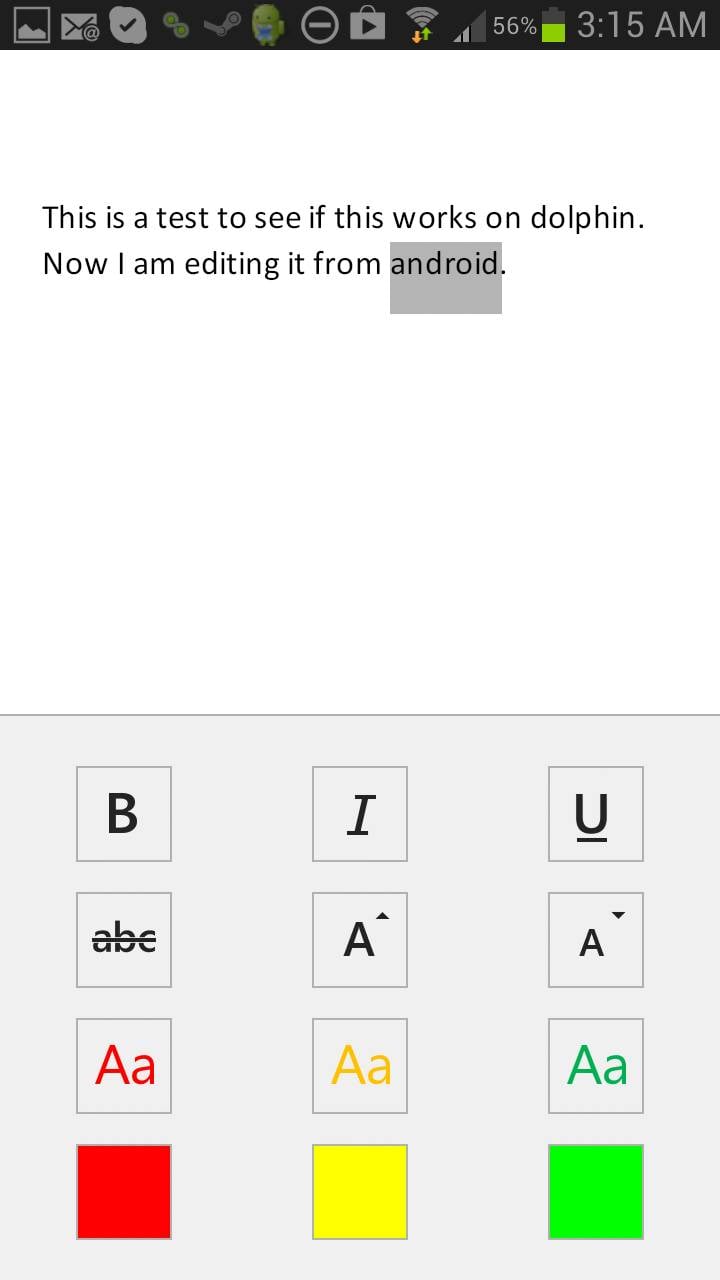
Run Dolphin in Desktop Mode

To get the Office 365 web app working on an Android device – assuming you have a subscription – you need to set your browser to request the desktop site.

Chrome can do this out of the box. Dolphin can do it by enabling the "desktop toggles" extension. Unlike Chrome, when you turn the extension on in Dolphin it stays on and passes desktop headers to all future sites.

Run Chrome in Desktop Mode

The problem is that the Office 365 web app simply doesn't work on most Android devices. Chrome flatly refuses to treat the mouse like a mouse. You can't highlight things like an adult and forget right-click context menus.

Dolphin is somewhat better. It doesn't understand the concept of multiple buttons on a mouse and thus you can't get your right-click context menus, but at least it passes the primary mouse button back to the Office 365 application so we have highlighting, dragging and dropping.

Office 365 is actually rather well designed for single mouse button scenarios, so although the lack of a context menu slows me down, it is not a show stopper.

Office 365 for Android on Dolphin

Hardware definitely limits possibilities. My first-gen Asus Transformer's 1GB of RAM simply isn't enough. The anaemic Tegra 2 struggles to keep up, and frankly the whole thing is a mess.

The quad core and 2GB of RAM in my Galaxy Note 2, however, seems to do the trick. Dolphin has no trouble here. Off I go writing articles.

Phone fodder

Microsoft has created a downloadable Office 365 app for Android phones. That naturally lasted about eight seconds after the announcement of availability and you have to be deaf, dumb and blind not to be able to find the .apk file if you go looking for it.

Office 365 for Android Text Modification OptionsAt first, I was rather irked with Microsoft. I figured it was doing something irritating like protecting its office monopoly by restricting the Office 365 app to phones.

But the rationale is far more mundane. In truth, the app is exactly right for a phone and useless for a tablet.

You won't be writing articles on a phone. Not even a Note 2. (I have tried. It causes all of the sads.) You might open a document, make a few token changes and save it… and that is all the Office 365 app is good for, though you can create documents and spreadsheets if you wish.


Microsoft's efforts with the Office 365 app are in line with the previous yeoman's work done on the OneNote and Lync apps. They are absolutely top-quality applications for the intended target market.

Target practice

I expect Microsoft will have to write a separate Office 365 app for Android tablets, assuming we can convince it that there is enough of a target market there to care about.

It is really a chicken-and-egg situation. People steer clear of Android tablets because the tablets don't have a good productivity suite. They don't have a good productivity suite because there is no market for it.

The more important question for Android users is why would Microsoft be interested in jump-starting the Android tablet market?

Anyone who starts using Android tablets for productivity won't be coming over from Apple. They would be choosing Android instead of Windows and there is not much profit in that for Microsoft.
In almost every technical aspect¸ Windows RT is a better operating system. The problem is that Microsoft blew the launch and missed a very narrow window.
The tablet market is still very much up in the air
Microsoft completely miscalculated the price people would be willing to pay, didn't include Outlook, had no app ecosystem to speak of and artificially restricts developers and end-users from turning Windows RT into a full-blown productivity device.

Despite this, the tablet market – and dominance of the next generation of endpoints – is still very much up in the air. Google constantly machine guns its own feet with exactly the same sort of short-sighted protectionist nonsense that has been hindering Microsoft for years.

The allergy to mice in Chrome for Android is one example: Google sees mice in Android as a massive threat. Android is local-application based.

If people could use a keyboard and mouse with Android properly, then they would have no reason to move away from the local-application model. Google's future is bet on SaaS applications and tied to Chrome OS.

The browser rules

Under no circumstances does Google want Windows to be replaced by Android. Android could fork and suddenly Amazon is somehow a player. Google wants you in the browser where it can own you.

Office 365 for Android Copy Balls

When push comes to shove, however, what people actually want is Microsoft Office on their Android devices. We can get it on our phones. The lucky few can get a mostly working version in their browsers. The rest of us will work around the limitations and wait.

The redefinition of the endpoint brought about by the mobile revolution is still underway. With the release of a working Office app for Android phones – something once considered an outright fantasy – all bets are off.

Read the full article here:  http://www.theregister.co.uk/2013/09/20/office_365_on_android/

For more information on anything you have read in this article please contact the IT Experts at Click Networks on 0141 530 9116 or visit our website: http://www.clicknetworks.co.uk 

Monday, 9 September 2013

The new Yahoo logo underwhelms

You may have missed last month's "30 Days of Change" campaign, during which Yahoo rvealed a new variation on its logo each day, as a teaser for the final version which, according to CMO Kathy Savitt would be a "modern redesign that’s more reflective of our reimagined design and new experiences.”

Well, the new logo, created in-house by Yahoo's brand design group and product designers, has now been released. Yes, it has kept the familiar color (Pantone Violet C), exclamation mark and different letter sizes (which apparently represent a yodel). But the font has changed to a custom one using a curious chiseled color scheme that doesn't work well at small sizes. Even stranger, the exclamation mark animates briefly online, which is rather dated idea. Speaking of the final design, Savitt states that, "We wanted a logo that stayed true to our roots (whimsical, purple, with an exclamation point) yet embraced the evolution of our products."

Much of the credit for the final design would seem to go to hands-on CEO Marissa Mayer, who in a post claims to have spent the "majority" of a weekend with her team "designing the logo from start to finish." Mayar waxes poetic about Adobe Illustrator, declaring it to be "one of the most incredible software packages ever made" and claims to be a user, to the extent that she knows "enough to be dangerous :)." Could this be a new trend, for CEOs of billion-dollar firms to spend a weekend with their teams cranking out a new logo? Design firms are trembling at the thought.

Read the full story here: http://stocklogos.com/topic/new-yahoo-logo-underwhelms 

For information on anything you have read here, or for more advice about web or graphic design please contact the IT Support Glasgow experts at Click Networks on 0141 530 9116 or visit our website here: http://www.clicknetworks.co.uk/Services/web-design.aspx 

Wednesday, 17 July 2013

Speed up your browsing with these Google Chrome tips!

1. KNOW YOUR KEYBOARD SHORTCUTS

Like any good browser, Google Chrome has several dozen different keyboard shortcuts that can help improve your productivity. Below is just a few of our top favorites. 

Ctrl + 1-8 = Pressing Ctrl and any number 1 through 8 will move to the corresponding tab in your tab bar.
Ctrl + 9
= Switch to the last tab.
Ctrl + H
= Show history
Ctrl + J
= Open Downloads window
Ctrl + K = Move the cursor to the Omnibox (address bar)
Ctrl + T = Open a new tab 


2. USE THE 'OMNIBOX' FOR MORE

The Google Omnibox does more than displaying the URL and allowing you to search. It is also capable of performing mathematical calculations (as shown in the picture) and even answer questions such as "how many cups are in 2 liters?" Try adding any math calculation now in the Omnibox without pressing enter to have the results shown. 

3. SYNC CHROME WITH YOUR GOOGLE ACCOUNT

Chrome allows you to sync your settings, passwords, and bookmarks to your Google account. This is a great feature for anyone who switches computers (e.g. work computer and home computer) and needs access to all their bookmarks and account settings. You can log into your Google Account and adjust your sync settings by going into Settings under the "wrench"  Chrome wrench icon or "Menu" Chrome Menu button icon.

4. PIN YOUR FREQUENTLY USED TABS

Pin your favorite tabs to save space on your tab bar without losing quick access to your favorite pages. In the above picture, you can see we have eight pinned tabs, which would have normally consumed our tab bar. 

Pinned tabs

To Pin a tab right-click on any open tab and click Pin Tab.
Bonus tip: You can also click-and-drag a pinned tab to the position of your choice. 

5. QUICKLY CLOSE A TAB

Any tab can be closed by clicking on the x on the tab. However, there are much quicker ways to close a tab. For example, if you have a mouse with a wheel pushing in on the wheel anywhere on the tab will close the tab. The shortcut keys Ctrl + W or Ctrl + F4 will also close the current open tab.
Bonus tip: Middle-clicking on any link will also open that link in a new tab.


For more informaiton on anything you have read in this blog post or for IT Support Help in general contact the IT Support Experts at Click Networks today! Call us now on 0141 530 9116 or drop us and email to info@clicknetworks.co.uk. Visit our website for more details: http://www.clicknetworks.co.uk 

Monday, 3 June 2013

10 Firefox features you should know about

A raft of new features have either been added to Mozilla’s browser or are on the way (showing up in the Beta, Aurora and Nightly builds). Here are the most noteworthy.

Private Browsing

This mode lets you browse in a private session where the cookies, history and other things tied to your browsing activity are purged after you close the program. From the browser, you launch a new, separate browser window in private mode, and it will run simultaneously along with the normal one (which you can close, but continue to use the private-session mode).

Third-Party Cookies Blocked

A future version of Firefox is planned to specifically block third-party cookies by default. The scheme will permit cookies originating from sites that you regularly visit, but prevent those from installing that come from other sources (like an advertising company) you don’t directly visit. A similar version of such a privacy protection is already built into Safari, while Chome allows all cookies and Internet Explorer blocks some third-party ones.

Click To Play Plugins

Mozilla applied their Click to Play security system to all third-party plugins, except to whichever is the latest version of Flash at the time. So by default every plugin embedded in a web page is now blocked with a notice, and you need to click this notice to activate the plugin. Click to Play also advises you to update the plugin in question to its latest version. If you trust a particular website, you can whitelist it so that Firefox automatically loads any plugins on it whenever you visit.

Plugin Warnings

Speaking of plugins, if one freezes up for more than 11 seconds, the latest Firefox will notify you and let you restart the plugin -- and do so without needing to reload the browser.

Faster JavaScript Processing  

Firefox now uses a JavaScript engine named IonMonkey that’s faster than its predecessor. Indeed, when used to interact with certain JavaScript-heavy sites, like Facebook, the latest version of the browser has a noticeable improvement in speed over last year’s releases.

Download Manager Toolbar

There will soon be some enhancements to the way Firefox handles downloads. To the right of the search box, there will be a toolbar icon of a downward arrow that will show the time remaining for a file as it is being downloaded. Click this icon, and a small status window will pop open below it, showing a progress bar for the download. These little touches won’t be enough to replace the more sophisticated third-party download managers available for Firefox as extensions, but they should be sufficient if you don’t do much file downloading through the browser.

Built-In PDF Viewer

Chrome and Safari have had this convenient function for a while, and now Firefox will, too, as of its final Version 19 release. Click a link to a PDF file, and the browser will load and display the document in a tab, rendering it via the wonders of HTML5 and JavaScript. You can also use Firefox to load and view PDFs already saved on your computer’s local storage medium.

Retina Display Support

The OS X version of Firefox supports the high-resolution, pixel-dense screen of the MacBook Pro with Retina Display. So the GUI and text of Firefox running on OS X 10.7 or greater do not appear tiny on these Apple notebooks, and look sharper.

UI Improvements to Firefox for Android

With regard to Android, the Mozilla team has been adding noticeable improvements to the mobile version of Firefox Beta and Nightly. It now has a private browsing mode, although, if you have normal and private sessions open, they both run under one instance of the browser. Other enhancements concern the placement of the tabs tray: it will automatically reposition itself horizontally if you hold your phone in landscape mode, and vertically if you hold your device in portrait mode. But its positioning is opposite when the browser is used on a tablet (i.e. vertical when held in landscape mode, etc.).

Firefox for Windows 8 Modern

Mozilla is developing a variant of Firefox for the Windows 8 Modern UI. As of this writing, it comes with the Firefox Nightly for Windows build, and is activated when you set it as the default browser for your Windows 8 system. So far, Metro Firefox is a very basic browser with a minimal feature set. It sports a mobile-centric UI, which is essentially identical to that of the Android version of Firefox. Its present incarnation doesn’t offer a browsing experience that is faster, or otherwise better than Internet Explorer 10. But Firefox is, for now, the only alternative web browser designed to adhere to the Modern UI guidelines.

Read the full story here: http://www.computerworld.com/

For more information about this article or on anything you have read in our blog please contact the IT Specialists at Click Networks today on 0141 530 9116 of email us at info@clicknetworks.co.uk or visit our website here: http://www.clicknetworks.co.uk

Wednesday, 8 May 2013

How to get your post seen on your Facebook News Feed?

Let’s start by stating the obvious, Facebook’s EdgeRank is complicated and it will be nearly impossible for any business to lay down an accurate projection of what is going to happen with each post published to the network.


While that could be a huge waste of time, having a basic understanding on how Facebook determines why some people sees your posts and others don’t is very important.

There are many factors playing a role in this mumbo jumbo that goes from previous affinity between the source and the recipient to the impact each piece of content generates and even negative feedback. All these items are directly affecting your Facebook Reach on a post-by-post basis.

The Infographic breaks down Facebook’s News Feed algorithm in 2 categories, which helps understand this better:
  1. Personal Interaction, which includes affinity with the author and type of post
  2. Network Reaction, which of course means engagement, positive or negative.
One last thing I’ll mention before leaving you is this, the News Feed is the single most important element of Facebook, you should understand how it works. In 2012, 40% of the time spent on the site goes to the News Feed, compared to 27% the previous year.

Read the full article here: http://socialmouths.com/blog/2013/04/17/who-is-more-likely-to-see-your-posts-on-the-facebook-news-feed-infographic/#more-11283 

For more information on anything you have read here or for more information on how to impove your online social media presence contact the IT Support Experts at Click Networks on 0141 530 9116 or visit our website here: http://www.clicknetworks.co.uk 

Monday, 29 April 2013

3 Essential Employee Tech Security Steps

Due to the populartiy of our last article on some of the misconceptions of computer viruses and steps to avoid them, below are 3 more essential tech security steps you can teach your employees.

 Think about your office and the people you have sitting behind the computers.  Or think about your remote workforce in their home offices or on the road with their laptops and mobile devices gripped firmly in their hands.  Whether you realize it or not, all of these workers play a vital role in protecting your company from a security breach.
You may feel pretty safe and secure with all of the latest and greatest security innovations installed, but if your employees don’t adhere to safe computing practices and use the technologies properly, you may be at risk, even more than you think.  Many small businesses don’t have an IT staff so it takes time and training to get employees to maintain data security.
Here are some tips to ensure that your work force is ready to defend your business and its valuable data.

1.  Email Responsibility:  The level of sophistication in targeting individual email accounts has become even more threatening by hackers and scammers.  How many times have you received an email trying to get you to click on this or that?  One simple click can expose business and personal information without your employees even knowing they have done anything wrong.
E.D.S.C.B. to protect your valuable business information: 
  • Exercise judgment before opening email attachments. Suspicious emails or email attachments should not be opened.
  • Disable the option to automatically download attachments. As a convenience, some email programs will offer automatic download, but if a harmful attachment comes through, it can lead to big trouble.
  • Scan attachments with antivirus software before opening or downloading to your computer.
  • Complex email passwords. Include upper and lower case letters, numbers and punctuation marks or other symbols to make passwords more complex.
  • Beware of any attachment with an “.exe” filename extension, which may begin executing a program as soon as the attachment is opened.
2. Wireless internet connections merit caution:  
Wireless internet connections are a remote worker’s best friend.  But public wireless hotspots can be a cybercriminals playground when open networks don’t encrypt data, emails passwords or other information.  Remind your employees when they have the choice between a secure wireless connection, which will require a password, and a public hotspot, they should always choose the secure connection.
However, there will be times when employees may have to use a public hotspot Therefore, they should know how to make sure their firewall is on.  They should also know how to disable file and printer sharing and how to make their folders private.
Manage these tasks through the computer’s System Preferences or Control Panel, where the internet, user settings and security can be reviewed and adjusted.  If you need advice on managing these tasks, go to your computer’s help and support index.
Another option you can utilize to safeguard data is by protecting it on a corporate network or in the cloud.  There are numerous cloud storage options for small businesses.

3. Use smartphones conscientiously:
Employees commonly do work related tasks from their personal mobile devices, which opens new opportunities for security breaches.
Consider developing a Bring Your Own Device (BYOD) policy that includes parameters on how and when employees can use their personal mobile devices for work purposes.  Make sure your policy includes specific guidelines for smartphone security, like a password policy, list of supported devices and others that are not allowed to be connected to the network and a protocol for installing applications.  These can become easy entryways for malware if not attended to properly.
A lost or stolen smartphone can also open up an opportunity for a data breach.  You can require your employees to use tracking services offered by carriers like AT&T or Verizon to find the location of lost devices, remotely lock them or erase data.  For more assistance in developing a BYOD policy that’s right for your business, consider getting guidance from a local IT provider or expert.

Read the full article here: http://blog.computerservicenow.com/posts/2013/03/06/teach-your-employees-3-essential-things-about-tech-security/

For more information on anything you have read in this article or about any IT related issues, contact the IT Support Experts at Click Networks today. Call us on 0141 530 9116 or visit our website: http://www.clicknetworks.co.uk

Thursday, 21 March 2013

What is NFC? (Near Field Communication)

NFC is getting a great deal of attention as it becomes included in more smartphones, laptops, and other devices. It’s being hyped as ‘The Next Big Thing’ that will change how we use our mobile devices: everything from shopping to interacting with your home and unlocking your car.   So is this new development a “flash in the pan”, or do you foresee real world uses for such a technology?

Well, what is NFC?

NFC stands for Near Field Communication and, as the name implies, it’s a set of close-range wireless communication standards. NFC equipped smartphones and other devices can exchange information with each other with a simple tap or a wave; simply hold your NFC enabled device in the proximity of an NFC enabled media, such as a sticker, or poster.  There are many uses for such a technology ranging from the basic launching of a browser on your target device to sending an email, or to more complex actions such as controlling the lights in your house, unlocking a door or starting a car engine. Essentially, anything that can be automated electronically can be interacted with via NFC.

Which Devices Have NFC?
Many smartphones, tablets and new laptops now have NFC chips. NFC World  has an extensive list of all the phones around the world that are NFC-equipped.  Google Nexus variants have NFC, as do several BlackBerries, HTC phones, and others.

What Exactly Can I Do With NFC
NFC is most commonly associated with the “mobile wallet”—the idea that your smartphone will replace your cash and credit cards. In one tap or wave of your phone, you can pay for your shopping or redeem offers or coupons.
Beyond mobile payments however, there is a world of uses for NFC, including:
  • Providing interactive tickets or entry passes to your event.  This can be in the form of a standard ticket, or embedded into wristbands, worn by the attendee.
  • Downloading information. Advertisers and marketers can use NFC chips in posters and other promotional materials so all you have to do to get more information is tap or wave your phone (quicker than scanning QR codes, and certainly easier on the eye).
  • Ease of company travel. NFC technology can enable ‘car mode’ when your employees get into a vehicle, launching satellite navigation and disabling mobile phone capabilities, thereby increasing productivity and promoting safe driving within your organisation.
  • Provide offers, or promotions to customers via an NFC enabled key ring or badge. Free product offers or promotional codes can be programmed onto the media, which can then be redeemed in store using an NFC enabled device to scan the media.
Right now, NFC hasn’t hit the mainstream in terms of usage, but it’s the potential that’s making it pretty interesting technology.
..

Read the full article here: http://www.techradar.com/news/phone-and-communications/what-is-nfc-and-why-is-it-in-your-phone-948410 

For more information about anything you have read here please contact the IT Support Glasgow Experts at Click Networks. Visit our website: http://www.clicknetworks.co.uk or call them on 0141 530 9116

Tuesday, 12 March 2013

Samsung Galaxy S4 set to beat the iPhone


Samsung is to release its Galaxy S4 smartphone at an event in New York this week, a move that could see it beat Apple's iPhone 5 in terms of both sales and technology.

The once dazzling Apple brand has been tarnished in recent months by a series of gaffes and poor strategic decisions.

The Maps fiasco of September 2012 directly contradicted CEO Tim Cook's statement last month: "The only thing we'll never do is make a crappy product."

The brand has been perceived as a bully for its handling of the patent trials against Samsung, and it has been similarly insensitive in handling recent shareholder rows over the lack of dividends and its huge cash stockpile.

Richard Holway, chairman of analyst firm TechMarketView, pointed out that consumers are also less positive about Apple than they used to be.

"The Apple iPhone used to be ‘cool'. Now the ‘cool' smartphone is the Samsung Galaxy. Indeed there is more anticipation about the imminent release of the S4 than about any new Apple product. Today I heard the iPhone described as ‘Grandad's phone'. Insults don't come more hurtful than that!" he wrote on his blog.

The S4 is rumoured to include technology to enable users to pause video and scroll the screen simply by moving their eyes, using motion-tracking technology in the user-facing camera. These rumours are corroborated by the fact that Samsung registered 'Eye Scroll' and 'Eye Pause' as Trademarks in Europe earlier this year.

Whereas the iPhone 5 has an 8 magapixel rear-facing and 1.5 megapixel front-facing cameras, the Galaxy S4 cameras are 13 megapixel and 2 megapixel respectively.

And pictures taken by these cameras will be viewable at a higher resolution on Samsung's device - the S4's screen has 440 pixels per inch compared to the iPhone 5's 326.

There is more grunt powering the S4 too, with its eight core Exynos 5 processor running at 1.8GHz, compared to the iPhone 5's dual-core 1.3GHz A6 processor.

Both phones will compete not just for market position, but also for raw materials such as rare earth metals, and components for the latest generation touch screens, which are swallowed up by demand as soon as they are manufactured.

Some industry insiders say that many suppliers may start switching allegiance from Apple to Samsung, and give them more resource.

However, the situation could be further complicated if Apple brings forward the release of its latest smartphone, the iPhone 5S. If Apple is able to provide something genuinely innovative rather than a minor iteration on an existing design, it could reignite consumer demand and cement its position at the top of the tree.

Read more: http://www.computing.co.uk/ctg/news/2253686/galaxy-s4-could-see-samsung-beat-iphone#ixzz2NJqZAfH4
Computing - Insight for IT leaders Claim your free subscription today.


For more information on any on the technology in this article please contact the IT Support experts at Click Networks Glasgow. Visit our website here: www.clicknetworks.co.uk

Tuesday, 19 February 2013

Why are online companies moving into TV??

Figures are not out yet for how many people signed up to Netflix in the past week, drawn in by Kevin Spacey's House of Cards drama series, but it marked a significant shift in where we'll find 'must see' TV in the future.

Netflix plan to make at least five new shows a year for their web streaming service and they're not alone.

"I think it will certainly be a very exciting year for online content," notes Director of Amazon Studios, Roy Price.

Price is responsible for making original TV content for Amazon's pay subscription services - Amazon Prime in the US, and Lovefilm in the UK.

"The line between online and 'other' probably starts to become a bit blurred," he admits, adding that Amazon Studios currently has six shows being piloted.

"Right now we have a range," says Price, "we have kids, mostly focusing on pre-school educational content.

"And then on the adult side I would say it is all right now, half hour and comedic in nature."

Microsoft's plans aren't quite as fully formed yet but creating a TV studio in Los Angeles this year is the main objective with original content from all genres being considered.

The programming would sit on Microsoft's Xbox live and use the interactivity that service can offer.
And then there's YouTube, owned by Google.

The online site recently launched its original channels initiative with 20 new channels coming from the UK.

"YouTube gave an advance on future advertising revenue to a few channels," explains Google's Zayna Aston, "to basically help kick start the production of original content on the platform."
'Food Tube'
 
One of those channels is Jamie Oliver's Food Tube which already has 143,000 subscribers, 13 million video views, and it only launched on 21 January 2013.

Whereas Amazon, Microsoft and Netflix own their content, YouTube does not, choosing to concentrate on its proven technology platform instead.

So should traditional TV networks feel threatened by their online competition?

"I think it will be interesting to see how everything evolves with respect to all the different channels and sources of content," muses Amazon's Roy Price.

"And for now all we can do is create the best service we can and certainly to date we co-exist quite amicably with all of our channel and other programming partners."

Traditional TV channels are not being complacent, with audiences increasingly using on demand services such as itv player, 4OD and the BBC's iPlayer.

Victoria Jaye oversees all of the BBC's TV content online and aside from recent statistics that revealed a 177% year-on-year increase in the use of mobiles and tablets to watch shows on iPlayer, there's been another shift.

Jaye says in 2008, 25% of people coming to iPlayer were just browsing.
That's now risen to 42% marking "a change in iPlayer from this catch-up product or utility to a sort of discovery or entertainment experience".

"I think it's really fantastic," reflects Jaye, "that we are seeing the on demand market become creatively competitive with people like Netflix originating content.

"We really want a creative competitive on demand market so for us this is, 'Bring it on!' We're excited."

Please read the full article here: BBC NEWS

For more information on anything you have read, please contact the IT Support Experts at Click Networks in Glasgow. Visit our website: http://www.clicknetworks.co.uk/ 

Monday, 11 February 2013

The end of CAPTCHA?? Gibberish form verification words

It now feels perverse, but about a decade ago, when I first encountered the CAPTCHA system, I found it … satisfying. Even vindicating. I can’t recall what gibberish words I first correctly deciphered, but it was a moment I'd been awaiting since third grade. That year, my teacher summoned my parents to admonish them for my abysmal, no-good, impossible-to-read handwriting. This would be a recurring source of recrimination for me, so it was a redemptive moment when I realized that this skill I'd acquired of reading poorly formed letters, honed over decades, was not only useful, but a defining characteristic of what separated people from machines.

At first, CAPTCHA felt like a simple and agreeable game. You played it quickly, strengthening your bond with the rest of mankind, putting off the day machines will roam the Internet freely, and perhaps come to rule over us in some dystopian Matrix-like future, and went on about whatever mundane task you'd been trying to do—buy concert tickets, post a comment, whatever. It was a pleasant interruption, like a kindly stranger asking you directions before you went on your way.

But like so many things in life, that initial glow faded quickly. Instead of a quick and painless waypoint, the CAPTCHAs got harder in an effort to keep ahead of ever-smarter bots. Solving one no longer recalled the satisfying click of a fastened seat belt, but instead was akin to achieving a perfect seal on a generic imitation of a Ziploc bag. You could do it, but it'd be annoying, and it would take longer than you'd want it to, and even then not work as well as it was meant to.

As the CAPTCHAs were getting harder, I realized I wasn't seeing so well and went to get glasses for the first time. Now, each time I failed one of those tests, en route to registering for a website I didn't really want to have to register for anyway, I was left wondering whether it was the fault of my weakening eyes or the algorithm. I was afraid of being enfeebled while still a young man, left behind by technology, and wondering if the kids in school now could solve these CAPTCHAs easily.
So Wednesday’s news that Ticketmaster is abandoning CAPTCHA feels like a sort of vindication to me. It hasn't just been me. The system is to blame.

If, though, this is progress after a fashion, let's not take it to mean that computers are getting close to passing as human. CAPTCHA set out to be a way for a computer to be able to distinguish between one of its fellows and a person. The Turing test asks whether a human can make that same judgment, which is a very different question.

Ticketmaster customers will now face “phrases, questions or ads” during check-out. One would imagine that asking questions about the world might be a risky proposition, ignorance being rather more widely distributed than one would hope. It's hard to come up with questions that can be reliably answered by any human being that stumbles across a given website. Another CAPTCHA alternative relies on authenticating users’ identities via credentials issued to them by Facebook, Google, Yahoo, and the like. CAPTCHA, for all its frustrations, was a mechanism that allowed for anonymity. You didn't have to prove who you were, merely that you were. The loss of anonymity online brings a whole new set of headaches, more enduring and harder to parse than the transient ones brought about by a struggle with wobbly characters.

But I won't miss trying to tell a 0 from an O, H from 4l, or q from g. It will make a funny story for future generations, that for about a decade at the beginning of the century, we'd agreed as a society that the defining mark of our shared humanity was an ability to read bad handwriting.

Read the full story here:  http://www.slate.com/blogs/

For more information and advice on anything you have read here please contact us or visit our website here: www.clicknetworks.co.uk

Tuesday, 22 January 2013

Web 're-defining' human identity says chief scientist

Social networks such as Facebook and on-line gaming are changing people's view of who they are and their place in the world, according to a report for the government's chief scientist.
The report, published by Prof Sir John Beddington, says that traditional ideas of identity will be less meaningful.

One consequence could be communities becoming less cohesive.
This change could be harnessed to bring positive changes or if ignored could fuel social exclusion, says the study.

"This can be a positive force, exemplified by the solidarity seen in the London 2012 Olympics or a destructive force, for example the 2011 riots," says the report.

"Due to the development of smart phones, social networks and the trend towards (greater) connectivity disparate groups can be more easily mobilised where their interests temporarily coincide."

"For example," it says, "a 'flash mob' can be mobilised between people who have not previously met".

The report, entitled "Future Identities," says that near continuous access to the internet, termed "hyper-connectivity", will drive profound changes to society over the next 10 years.
'Hyper-connectivity' Prof Beddington commissioned the study as part of the Government Office for Science's Foresight programme - the influential Foresight reports look ahead to highlight emerging trends in science and technology with a view to informing policies across government departments.
 
"The most dynamic trend (in determining identity) is hyper-connectivity," Prof Beddington told BBC News.

"The collection and use of data by government and the private sector, the balancing of individual rights and liberties against privacy and security and the issue of how to tackle social exclusion, will be affected by these trends," he said. "I hope the evidence in today's report will contribute to the policy making process."

This latest report on identity undertook 20 separate reviews in which leading UK and international experts assessed research in computer science, criminology and social sciences.

It states that the changing nature of identities will have substantial implications for what is meant by communities and by social integration. The study shows that traditional elements that shape a person's identity, such as their religion, ethnicity, job and age are less important than they once were.
Instead, particularly among younger people, their view of themselves is shaped increasingly by on-line interactions of social networks and on online role playing games.

The study found that far from creating superficial or fantasy identities that some critics suggest, in many cases it allowed people to escape the preconceptions of those immediately around them and find their "true" identity. This is especially true of disabled people who told researchers that online gaming enabled them to socialise on an equal footing with others.

  Social networks also helped people organise during riots in 2011
 
"The internet can allow many people to realise their identities more fully, " the authors write. "Some people who have been shy or lonely or feel less attractive discover they can socialise more successfully and express themselves more freely online".

The report points out that in 2011, 60% of internet users were members of a social network site, a huge surge in usage, up 43% from 2007. Consequently, it says that there may greater political activism using these networks as was seen in the revolution in Tunisia and the mobilisation of dissent in Egypt and Libya.

There will also be a blurring of work and social identities as photos and details of people's personal lives become increasingly public on social networking sites. The report cites a hypothetical example of how a young person was denied promotion because her employer found drunken photos of her from her university days.

The report says that as the distinction between online and real world identities diminishes criminals are likely to try and exploit the many new forms of interlinked data relating people's identities and from social media and professional and financial websites in order to steal identities.

Read the full story here: http://www.bbc.co.uk/news/technology-21084945 or contact the IT Support Specialist at Click Networks with any questions about anything you have read here. Please visit our website: http://www.clicknetworks.co.uk

Wednesday, 16 January 2013

Facebook Launch Rival to Google Search

Social-media giant wants new tool to keep users on site and grab a slice of sizeable advertising revenue tied to search.

Facebook wants each journey on the web to begin and end on its site. Its first significant move into search is designed to provide all the answers to users' questions: which of my friends like Rihanna? How many of my friends speak German? Which TV shows are my colleagues watching?

Graph Search, which was announced by Mark Zuckerberg on Tuesday, is a clear statement of intent. It is designed for the age of the social web, when internet users spend more time on Facebook or Twitter than they do searching the outside web.

How does it work? Users can search their friends, based on the information they have given Facebook permission to publish. For example, users will be able to quickly find "photos of my friends taken in Paris, France" or "Restaurants liked by friends in London".

Zuckerberg described Graph Search, in typical start-up fashion, as the "beta of version one". But he also described it as the "third pillar" of Facebook, after the news feed and timeline. He later said Graph Search could be a business in its own right – a remark that will prompt anxiety among Google executives.

The announcement – the first since Facebook's disastrous initial public offering in May last year – was strategically timed, ahead of its fourth-quarter earnings call on 30 January. Facebook has already succeeded in lifting its share price above $30. The announcement of Graph Search also comes as Facebook faces questions about whether its growth to 1bn users is petering out. Facebook's UK user total dropped by 600,000 in December, according to data from SocialBakers, a social-media monitoring company.

Nate Elliot, a social-media analyst at Forrester Research, said the graph search announcement was part of Facebook's ambition to keep users coming back to its site.

"Facebook's worst nightmare is a static social graph," he said. "If users aren't adding very many new friends or connections, then their personal network becomes less and less active over time. Terrifyingly for Facebook, that threat is very real. We haven't seen significant growth in the average number of friends per user recently.

"Graph Search seems designed to encourage users to add more friends more quickly. If it means users' personal networks change more frequently, and become more active, then that keeps them coming back to the site – which is vital to Facebook's success. If Facebook and Bing can bring elements of Graph Search to Facebook's web search tool, then that's great. But it's not the point; the point is to keep Facebook users more active within the site."

Facebook was quick to rebut many of the privacy questions that it expects to be raised about Graph Search, which essentially helps to surface photographs or other data which before may have been buried. Graph Search does not make public any information that was not previously public, so users need not rush to change their privacy settings. But some users may be surprised to be presented with photos that they did not know they had been tagged in.

Zuckerberg, a man whose past tangles with privacy still make him visibly nervous on stage, spent longer talking about privacy safeguards than at any other Facebook announcement I have seen. That may be a symptom of Facebook becoming a public company, or it could simply be a sign that it is simply growing up.

Whatever the cause, the prize for getting graph search right first time is very real: search makes up the largest portion of digital advertising spending in the US, up from $15.1bn in 2011 to $17.58bn in 2012. And which company commands 74.5% of that $17.58bn ad spend? Google.

Read the full article here: http://www.guardian.co.uk/technology/2013/jan/15/facebook-graph-search-google-user-decline or contact the IT Support Experts at Click Networks today, visit our website: http://www.clicknetworks.co.uk/  

Wednesday, 9 January 2013

Whats new from Click Networks in 2013

Happy New Year from everyone at Click Networks
New for 2013 - Professional IT Support without hidden costs

Why choose Click Networks to support your IT
Quite simply, we have been around long enough to understand what our clients want and what they expect to pay for. Therefore we have listened and are proud to be different from most other IT companies.

It is very common practice in our industry for most IT companies to charge anything from £95- £115 per hr to install a single PC, Printer or even a smartphone!!

Click Networks do not charge our managed service clients for installing new Printers, PC's, or even migrating data from their old PC's to the new ones. This could save you £100's each time you add or replace some PC's.

We even offer our managed service clients a free configuration service to set up their Smartphones, Ipad's Tablets and similar devices. This costs us time and money, but we believe it demonstrates our total commitment to providing a unique managed IT Service.


If you want to save money in 2013 with your IT Support and associated services, call our sales team today on 0141 530 9116 and see how much we could save you.

Monday, 7 January 2013

Google aims to lure '90% of Microsoft Office users'

Google is looking to lure 90 per cent of all Microsoft Office users to its Google Docs offering.
In an interview with AllThingsD, Google vice president and head of enterprise, Amit Singh (pictured), said that Google will step up its pursuit of business users.

"Our goal is to get to the 90 per cent of users who don't need to have the most advanced features of Office," he said.

The remaining 10 per cent of "advanced" users will continue to use the desktop version, he suggested.
Singh went on to explain that although Google Docs already coexists with Microsoft Office, the company is working hard to improve integration.

"In Q3, if you import from Excel into Sheets, you won't be able to tell the difference in Sheets. We know the gaps between our features and [Microsoft's]. We're improving them week by week," he explained.

Singh claimed that Microsoft's approach to its cloud offering was to increase the cost to its customers. He also claimed that Microsoft's overall market share had declined.

"Enterprise is the place where they are holding on. People are showing up at the office and bringing their own devices and expecting their employers to support them. And with Windows RT, there is no backward compatibility with all the apps. That's the first time that has happened in Windows. The Windows 8 move, they have done what they need to do, but it's fairly disruptive. SkyDrive is coming. SharePoint needs to integrate with Yammer. So, change is coming whether you like it or not," he said.
Google's rivalry with Microsoft in this area ramped up in 2012, with both vying for enterprise customers with infrastructure-as-a-service (IaaS) offerings in Compute Engine and Azure. Google had introduced Drive to enable users to store documents in the cloud and in response, Microsoft launched a similar service dubbed SkyDrive.

In late September, Google said that it would stop allowing users to save and export Google Docs files created using older 1997 to 2003 Microsoft Office formats from October 2012.

But due to a backlash, it subsequently gave users until 31 January 2013 to make the transition.
Google then announced that Google Apps, which includes Docs, would no longer be offered free to enterprise users. This suggested that users would have to make a choice between paying for either Microsoft Office or Google Apps.

Most recently, Google revealed that it had no plans to develop dedicated apps for Windows 8 or Windows Phone 8 for its business products such as Gmail or Drive – even though the firm remains committed to improving and updating its iOS products.

Read more: http://www.computing.co.uk/ctg/news/2233437/google-aims-to-lure-90-per-cent-of-microsoft-office-users#ixzz2HHK5JP6g
Computing - Insight for IT leaders

Monday, 17 December 2012

How hackers exploit social media

The phenomenon of "social engineering" is behind the vast majority of successful hacking.
This isn't the high tech wizardry of Hollywood but is a good, old-fashioned confidence trick.
It's been updated for the modern age, and although modern terms such as "phishing" and "smishing" are used to describe the specific tricks used, they all rely upon a set of human characteristics which, with due respect to Hieronymus Bosch, you might picture as the "seven deadly sins" of social engineering.

Apathy:
To fall for a confidence trick, or worse, we assume others "must" have taken the necessary steps to keep us secure.

Sadly this leads to a lack of awareness, and in the world of the hacker that is fatal. When we stay in a hotel and we programme our random number into the room safe to keep our belongings secure, how many of us check to see if the manufacturers override code has been left in the safe?
It's nearly always 0000 or 1234 so try it next time.

Curiosity:
Humans are curious by nature. However, naive and uninformed curiosity has caused many casualties. Criminals know we're curious and they will try to lure us in. If we see an unfamiliar door appear in a building we frequent, we all wonder where it leads. 

We might be tempted to open it and find out, but in the online world that might just be a trap waiting for an innocent user to spring it. A colleague built a website that contained a button that said Do Not Press, and was astonished to find that the majority of people actually pressed it.
Be curious, but exercise a healthy degree of suspicion.

Gullibility: It is often thought of as a derogatory term, but we all suffer from this sin. We make assumptions.
We take others at face value, especially outside of our areas of expertise. Put a uniform on someone and we assume they have authority.

Give an email an official appearance by using the correct logo and apparently coming from the correct email address, and we might just assume it's real, regardless of how silly its instructions might be.

All of this can be easily forged online, so make no assumptions.

Courtesy: We quite rightly all teach our children to be polite. However, politeness does not mean you should not discriminate.

If you do not know something, or you feel something doesn't feel quite right, ask. This principle is truer than ever in the online world, where we are asked to interact with people and systems in ways with which we are quite unfamiliar.

If someone phones you out of the blue and says they are from your bank do you believe them?

No. Phone them back. 

And by the way, use a mobile phone as landlines can remain connected to the person who made the call in the first place and so whilst you might think you're phoning the bank on a valid number you're just talking to the person who called you.

Greed: Despite what we'd like to think we are all susceptible to greed even though it might not feel like greed.

Since its inception, the very culture of the web has been to share items for free.
Initially this was academic research, but as the internet was commercialised in the mid-1990s, we were left with the impression that we could still find something for nothing.

Nothing is ever truly free online. You have to remember that if you're not the paying customer, you're very likely to be the product. In the worst case, you might find that you have taken something onto your machine that is far from what you bargained for.

Many pieces of malware are actively downloaded by owners unaware that the "free" product contains a nasty payload, even if it also appears to do what you expected of it.
 
Diffidence:
People are reluctant to ask strangers for ID, and in the online world it is more important than ever to establish the credentials of those whom you entrust with your sensitive information.

Do not let circumstances lead you to make assumptions about ID.
For example, if someone from "IT support" calls you and asks for your password so they can help fix your problem, how do you know they haven't called everyone else in the building first until they found you who has really got a problem?

This is a well-known attack. If someone has a problem with proving who they are, you should immediately be suspicious.

Thoughtlessness:
 Thinking before you act is possibly the most effective means of protecting yourself online. It is all too easy to click that link.
Stop.

How many of us when reading an apparently valid link in an email would bother to check whether the link is actually valid or whether instead it takes you to a malicious site.
It's horribly easy to make links look valid so try hovering your cursor over the link for a few seconds before clicking to see what the real link is: the true link pops up if you give it a moment.
As cynical as it may sound, the only answer is to practise your A-B-C:
  • Assume nothing
  • Believe no one
  • Check everything
With more Christmas shopping expected to be done online this year than ever before, you should watch out for those that would exploit the deadly sins.
Don't give criminals the chance to ruin your holiday season, and remember that a little bit of paranoia goes a long way online.

View the whole story here: http://www.bbc.co.uk/news/technology-20717773

For more information about staying safe online contact the IT support experts at Click Networks today on 0141 530 9116 or email us at info@clicknetworks.co.uk today!

Tuesday, 11 December 2012

What tablet to buy this Christmas?

We start with Microsofts Surface’s 1366 x 768, 10.6in IPS LCD screen which may only boast a pixel density of 148dpi but its 16:9 aspect ratio is shared with most laptops and TVs so you feel right at home from the off. This is a tablet that unashamedly delivers a PC experience, which I take to be A Good Thing. With an Nvidia Tegra 3 under the bonnet, a choice of clever attachable keyboards-cum-covers, a built-in kickstand, a proper USB port and an SD slot good for cards up to 64GB, it’s a device both powerful and versatile.

And don’t forget, the Surface comes with Microsoft Office pre-loaded. That’s the sort of productivity offering you just don’t get with Android or iOS.

On the downside, at £400 it’s not cheap; the OS takes up a huge chunk of the advertised storage space; both the Touch and Type keyboards are optional extras; there’s no GPS; and the Windows RT app store is close to empty at the moment.

Even the most devout fan of Android would have to concede that it has failed to repeat its smartphone success in the tablet arena but in the second half of the year Google came out swinging to try and fix that.

In the summer, it launched a Tegra 3-based 7in, 1280 x 800 tablet at a staggeringly low price. The Google Nexus 7 immediately won friends thanks to it’s powerful quad-core processor, excellent IPS LCD screen and Android 4.1 Jelly Bean OS, which debuted on the new tablet.

Just last month, the 16GB version dropped to £159 replacing the 8GB model yours truly bought, while a 32GB 3G device was also introduced at a very reasonable £239. The price changes have made something that was already very attractive even more so.

Being a Nexus 7 owner I’ll admit to a bit of bias here, but for gaming, e-book reading, web browsing, watching HD video - the stuff most of us do on our tablets most of the time - the Nexus 7 is hard if not impossible to beat.

How to trump that? Easy. Launch a 10in version with a screamingly fast dual-core Cortex A15 chip, a higher than hi-def screen and charge £319 for the 16GB version. That would be the Samsung-made Google Nexus 10 then.

The standout feature of the Nexus 10 is the 2560 x 1600, 300dpi screen, which clobbers even the “retina” 264dpi Apple iPad 4 in the pixel density stakes. I defy anyone to gaze at the Nexus 10’s screen, or listen to the sound from its front-facing stereo speakers, and not be thoroughly impressed.

It’s lighter and thinner than the iPad 4 too and more pleasant to hold thanks to it’s rounded shape. Probably harder to sue, too, for that same reason. If you want a 10in tablet for media consumption, this is the one you should buy.

Both Nexus tablets offer one sign-in syncing for your Picasa photographs, Google-bought books and movies, Google Docs and Drive content. This is cloud integration second to none. And don’t forget that Google Music has now arrived in the UK so you can upload 20,000 songs into the cloud too. And all for free.

For more information on any of the tablets mentioned in the article please contact our IT experts either call us on 0141 530 9116 or email at info@clicknetworks.co.uk for more IT support in or around Glasgow.

Read the full article here: http://www.theregister.co.uk/

Friday, 7 December 2012

Don't struggle to remember passwords!

Should you be secure and use lots of different passwords? Or is it more convenient and easy to remember just one or two?

Almost everything online needs a password these days: shop accounts social networking sites, university and email logins, banks, credit cards, insurance, savings and more. I don’t know about you – but I suspect I’ve over 50 different accounts and all the passwords for these need remembering somehow – and unless you’re a memory maestro that’s impossible.
Yet not doing it is a nightmare too – we’re constantly nagged to use different passwords. Those who chose convenience and used the same password for their PlayStation Network account as for their bank or other secure code, now know why it’s so important to use different passwords. They need to immediately change the password on their other accounts otherwise the criminal hackers may well have enough of their ID to utilise it (see PlayStation hack news for more on self-protection).

How to marry security and convenience.

Over the years I’ve developed my own personal system for keeping an easy but secure track of my passwords. I’m not saying it’s perfect I just thought it worth jotting down. I’m sure many others do similar things in parallel and I’d love to know your systems. 
I’ve described similar principles to what I do below, though with some details and techniques changed slightly for my own security. It may seem a little complex but actually as it’s developed organically over the years, it’s become an easy natural progression, though I accept it’d be more difficult to do it all in one go.
  • Step 1: Establish a number of key words. 

    Pick words that mean something to you but aren’t obvious or guessable like relative’s names. The easy way to do this is to start with one or two, then once those are firmly embedded add more. But for the moment let’s say they’re established.  They should all start with different letters, for the sake of the example we’ll say they are:
    Random
    Spank
    Widget
    Acne
  • Step 2: Establish a few key numbers.

    Try not to have obvious dates such as your date of birth – though something like 1874 (Churchill’s birth year) is fine. So here you have: 1874
    5012
    0191
  • Step 3: Create passwords using a combination of both. 

    Use the words or numbers forwards or backwards, capitalised or not capitalised. This gives you a very large number of available different passwords even though you only need to remember a few words and numbers. For example: – Spank0191
    – 1874Widget
    – 2105acne
    – modnar5012
    – Random18
  • Step 4: Note the password down IN CODE somewhere safe and convenient.

    Now just store the password safely in code somewhere in case it’s ever needed – never write the full words or numbers down anywhere, you need to remember those yourself. For example, the above passwords could be stored as… -S0  (ie, the word beginning with S then the numbers beginning with 0)
    -1W
    -Rev5 a  (ie, the numbers beginning with 5 in reverse, then the word beginning with a – but not capitalised)
    -Revr 5
    -R half 1 (ie, word beginning with R then half the numbers beginning with 1)
That’s my way. An alternative is to simply create yourself a grid for each password such as:
A  B  C  D  E  F  G  H  I  J  K  L  M  N  O…..ETC
3  D  A  F  U 2   1  P  R A  V 9  C   I   F
Here you remember just one key word, for example FAKE and you use that to look up the numbers in the password grid – here you’ll see its 23VU. 
To set this up initially you just need to write the alphabet out then put the code in under your key word and fill in the others with random letters.
This is a bit chunky to do, but it does mean you only need to remember one password to get encoded access to all the others. It’s probably most useful as a way of writing down pin numbers rather than passwords though.
OK those are some techniques, what are your tips? Ensure you don’t compromise your security in your response.

For more information on passwords or how to password protect your business and information contact the experts at Click Networks IT Support Team Glasgow on 0141 530 9116 or visit the website here: http://www.clicknetworks.co.uk/ 

To read the full article please visit: http://blog.moneysavingexpert.com