Hands on Unlike the video editing or
CAD workstation beasts that are still utterly reliant on Windows,
Android is slowly evolving into a workable platform for basic
productivity.
Browsers are becoming passable. Onboard applications
are decent and there are an ever-growing number of applications
designed for both touch input and mouse.
Yes, our little Android is growing up – that is, of course, if we ignore the total lack of a usable productivity suite.
Android is sneaking up on
five years
of general availability and it still doesn't even have a word processor
that can compete with Microsoft Word 2.0 running on Windows 3.1.
If
you want to paw at your screen like a primitive, there are plenty of
applications to let you consume content others have made. There are even
a few applications that will let you edit a word document or enter some
numbers into a spreadsheet. Slowly.
Touch input has severe
limitations. The first is a maddening upper limit on input speed and
accuracy defined by trying to hit touch targets that are significantly
smaller than your fingers and offer no tactile response whatsoever.
Editing, formatting and related tasks are byzantine in a touch-screen
world.
Consider
the humble task of highlighting a block of text. On a touch screen you
have to stab exactly the right spot, hope the device recognises the
great big blob that is your finger, press, hold and then wait for the
selector widgets to pop up.
After that you drag them around until
you have highlighted the relevant text, go find a touch target that says
"cut" or "copy" and then do something with that text.
In the time
it has taken a touch-screen user to do that, I have already moved the
text where it needed to go and written another four paragraphs of useful
text. Touch screens are simply terrible for real work.
One man and his mouse
Despite
this, I keep getting users who want me to make their Android devices
into all-purpose endpoints. They have an Android phone with four cores
and more RAM than that Acer Aspire from the mid-2000s that is wheezing
its last.
They have a Nexus 7 or an Asus Transformer that they
carry everywhere and they don't want to haul around some ageing notebook
that gets the digital equivalent of three miles to the gallon and
doesn't make it through a full-day conference.
Android is not
going away, so how do we get something usable on there? The answer
depends entirely on the device you have, the version and all the other
irritating little things that make Android ecosystem fragmentation such a
topic of legitimate complaint from developers.
In my opinion, the
best option currently available for a productivity app running directly
on an Android device is Office 365's web app. The latest version is
amazing. It beats Google's efforts and is so far ahead of everyone else
that at this point trying to catch up would be a depressing endeavour.
To
get the Office 365 web app working on an Android device – assuming you
have a subscription – you need to set your browser to request the
desktop site.
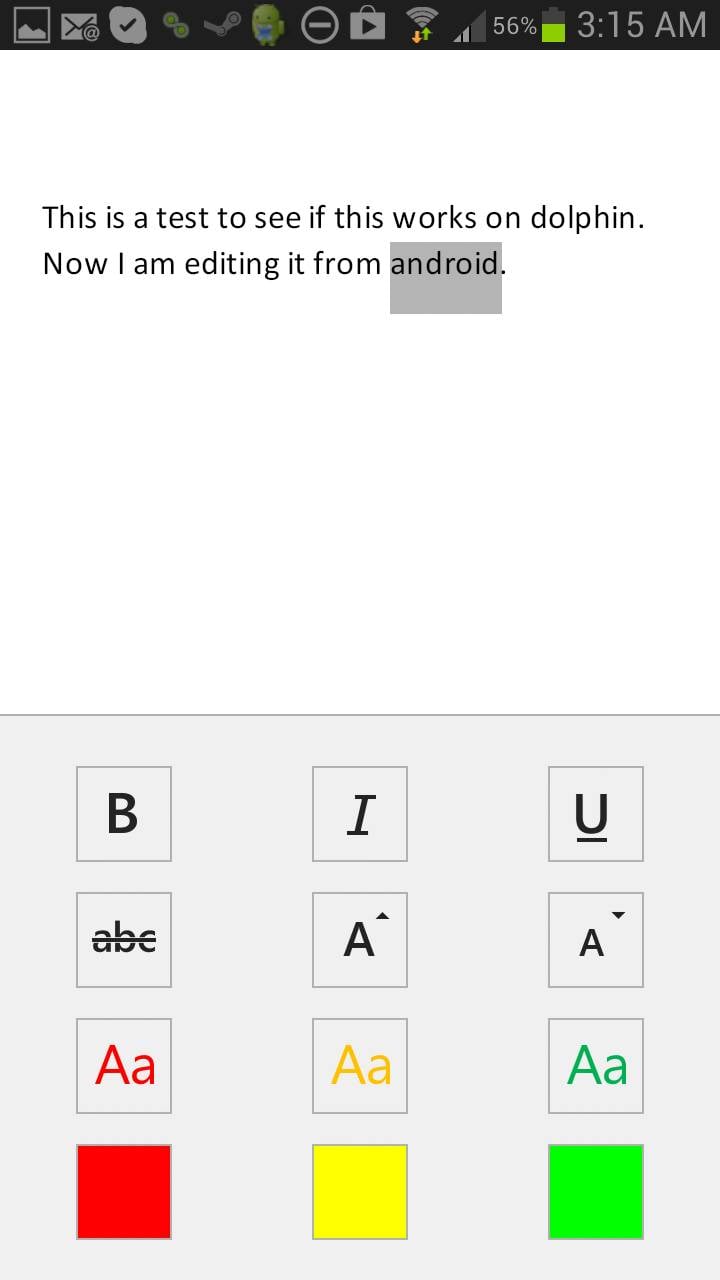
Chrome can do this out of the box. Dolphin can do it
by enabling the "desktop toggles" extension. Unlike Chrome, when you
turn the extension on in
Dolphin it stays on and passes desktop headers to all future sites.
The
problem is that the Office 365 web app simply doesn't work on most
Android devices. Chrome flatly refuses to treat the mouse like a mouse.
You can't highlight things like an adult and forget right-click context
menus.
Dolphin is somewhat better. It doesn't understand the
concept of multiple buttons on a mouse and thus you can't get your
right-click context menus, but at least it passes the primary mouse
button back to the Office 365 application so we have highlighting,
dragging and dropping.
Office 365 is actually rather well designed
for single mouse button scenarios, so although the lack of a context
menu slows me down, it is not a show stopper.
Hardware
definitely limits possibilities. My first-gen Asus Transformer's 1GB of
RAM simply isn't enough. The anaemic Tegra 2 struggles to keep up, and
frankly the whole thing is a mess.
The quad core and 2GB of RAM in
my Galaxy Note 2, however, seems to do the trick. Dolphin has no
trouble here. Off I go writing articles.
Phone fodder
Microsoft
has created a downloadable Office 365 app for Android phones. That
naturally lasted about eight seconds after the announcement of
availability and you have to be deaf, dumb and blind not to be able to
find the .apk file if you go looking for it.

At first, I was
rather irked with Microsoft. I figured it was doing something irritating
like protecting its office monopoly by restricting the Office 365 app
to phones.
But the rationale is far more mundane. In truth, the app is exactly right for a phone and useless for a tablet.
You
won't be writing articles on a phone. Not even a Note 2. (I have tried.
It causes all of the sads.) You might open a document, make a few token
changes and save it… and that is all the Office 365 app is good for,
though you can create documents and spreadsheets if you wish.
Microsoft's efforts with the Office 365 app are in line with the previous
yeoman's work done on the OneNote and Lync apps. They are absolutely top-quality applications for the intended target market.
Target practice
I
expect Microsoft will have to write a separate Office 365 app for
Android tablets, assuming we can convince it that there is enough of a
target market there to care about.
It is really a chicken-and-egg
situation. People steer clear of Android tablets because the tablets
don't have a good productivity suite. They don't have a good
productivity suite because there is no market for it.
The more important question for Android users is why would Microsoft be interested in jump-starting the Android tablet market?
Anyone
who starts using Android tablets for productivity won't be coming over
from Apple. They would be choosing Android instead of Windows and there
is not much profit in that for Microsoft.
In almost every
technical aspect¸ Windows RT is a better operating system. The problem
is that Microsoft blew the launch and missed a very narrow window.
The tablet market is still very much up in the air
Microsoft completely miscalculated the price people
would be willing to pay, didn't include Outlook, had no app ecosystem to
speak of and artificially restricts developers and end-users from
turning Windows RT into a full-blown productivity device.
Despite
this, the tablet market – and dominance of the next generation of
endpoints – is still very much up in the air. Google constantly machine
guns its own feet with exactly the same sort of short-sighted
protectionist nonsense that has been hindering Microsoft for years.
The
allergy to mice in Chrome for Android is one example: Google sees mice
in Android as a massive threat. Android is local-application based.
If
people could use a keyboard and mouse with Android properly, then they
would have no reason to move away from the local-application model.
Google's future is bet on SaaS applications and tied to Chrome OS.
The browser rules
Under
no circumstances does Google want Windows to be replaced by Android.
Android could fork and suddenly Amazon is somehow a player. Google wants
you in the browser where it can own you.
When
push comes to shove, however, what people actually want is Microsoft
Office on their Android devices. We can get it on our phones. The lucky
few can get a mostly working version in their browsers. The rest of us
will work around the limitations and wait.
The redefinition of the
endpoint brought about by the mobile revolution is still underway. With
the release of a working Office app for Android phones – something once
considered an outright fantasy – all bets are off.
Read the full article here: http://www.theregister.co.uk/2013/09/20/office_365_on_android/
For more information on anything you have read in this article please contact the IT Experts at Click Networks on 0141 530 9116 or visit our website:
http://www.clicknetworks.co.uk

 It is secure, anywhere access to email and calendars, Office Web Apps,
instant messaging, conferencing, and file sharing. See how Office 365
makes easy to communicate, create, and share in the cloud.
It is secure, anywhere access to email and calendars, Office Web Apps,
instant messaging, conferencing, and file sharing. See how Office 365
makes easy to communicate, create, and share in the cloud.